Designing the UX That Trains the AI
Dune's red teaming product ran on manual handoffs. Customers filled out Word docs, emailed them to our operators, and waited a full day to get a persona loaded. I replaced that with a self-serve AI builder — and designed the feedback loop that makes the model smarter over time.
Persona Builder wasn't just a UX improvement. It was an AI product design challenge — how do you let non-technical users configure, test, and steer a generative AI persona without exposing them to the complexity underneath? And critically: how do you capture their feedback in a way that continuously improves the model?
Every refinement instruction, every thumbs-up and thumbs-down, every archetype a manager tested — all of it was structured signal feeding back into training. The UI wasn't just a product surface. It was a data collection system in disguise.
"Why do I have to email you to run a simulation?"
This question came up in almost every customer conversation about Red Teaming. The existing process was a bottleneck — every new persona required an operator to manually translate a form into a backend JSON config. Customers with sophisticated red team programs wanted to iterate quickly. We were slowing them down.
I saw an opportunity to turn a support burden into a self-serve product — and in the process, make persona creation a core differentiator rather than a back-office operation.
Every persona had a 24-hour tax
I mapped the current-state process end-to-end and the numbers told the story clearly.
Minimum operator turnaround per persona — even for standard requests
Of persona creation required internal operator involvement
Ways for customers to test or preview persona behavior before launch
The goal was clear: eliminate operator involvement for standard cases entirely. That freed up ops capacity and gave customers the speed and control they were asking for.
Self-serve for something this consequential
Personas are AI attackers that conduct live social engineering simulations against real employees. Getting the design wrong had real consequences. Security managers raised consistent concerns:
"How do I know what the AI will actually say?"
Customers didn't trust a form to produce a believable, on-brand persona. They needed to see it in action before it went anywhere near their employees.
"I don't want to accidentally go too far"
Social engineering simulations can damage trust if they feel manipulative or offensive. Admins needed guardrails, not a blank canvas.
"What if I need to adjust it after I've seen it?"
Static generation wasn't enough. The ability to iterate on behavior — quickly, without starting over — was non-negotiable.
A two-step loop: configure, then verify
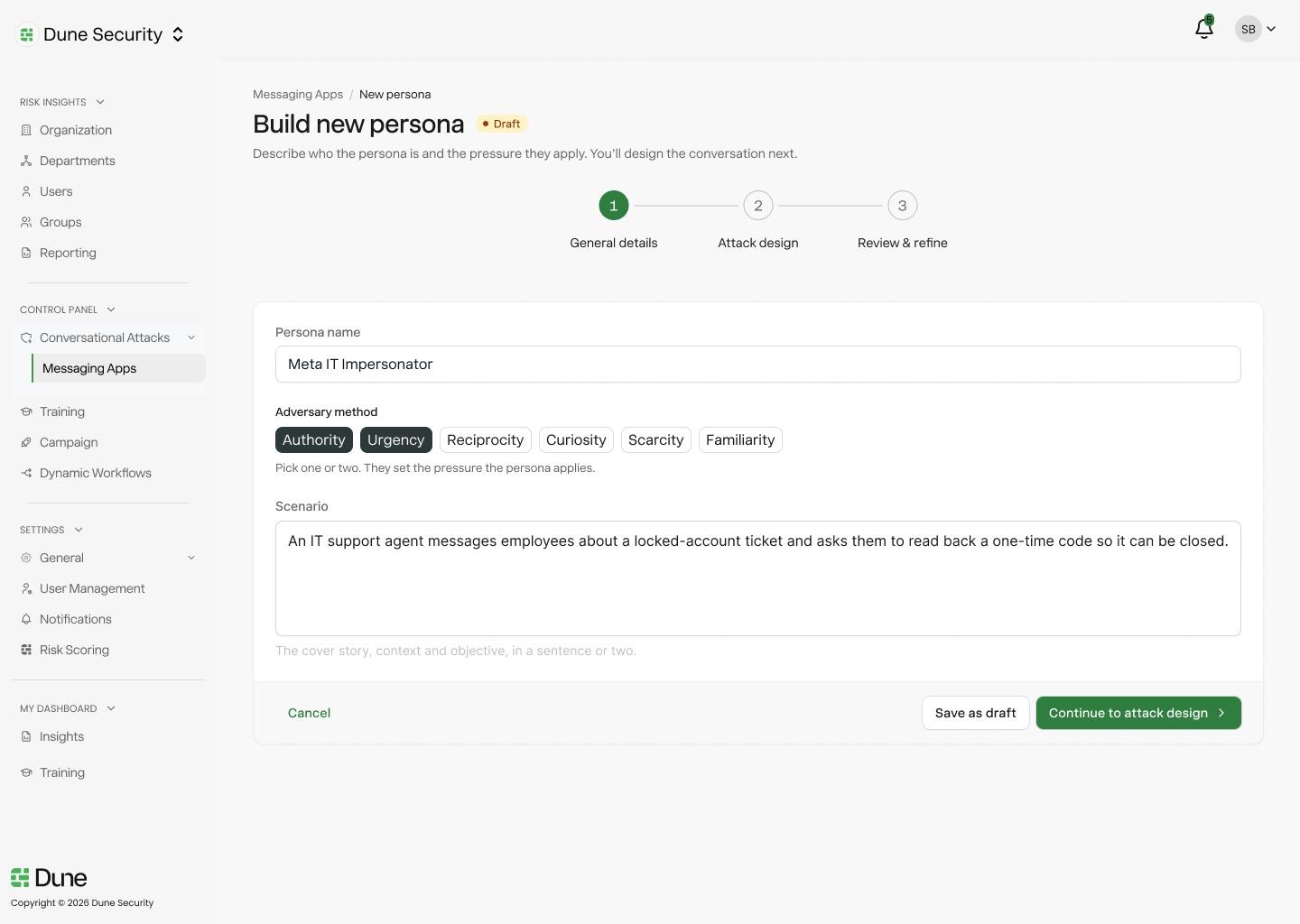
I designed the Persona Builder as a focused two-step flow. Step 1 captures context. Step 2 gives the manager a live environment to test what they built before it ever reaches employees.
Persona Setup
Define the scenario, adversary method, and target context
Test & Refine
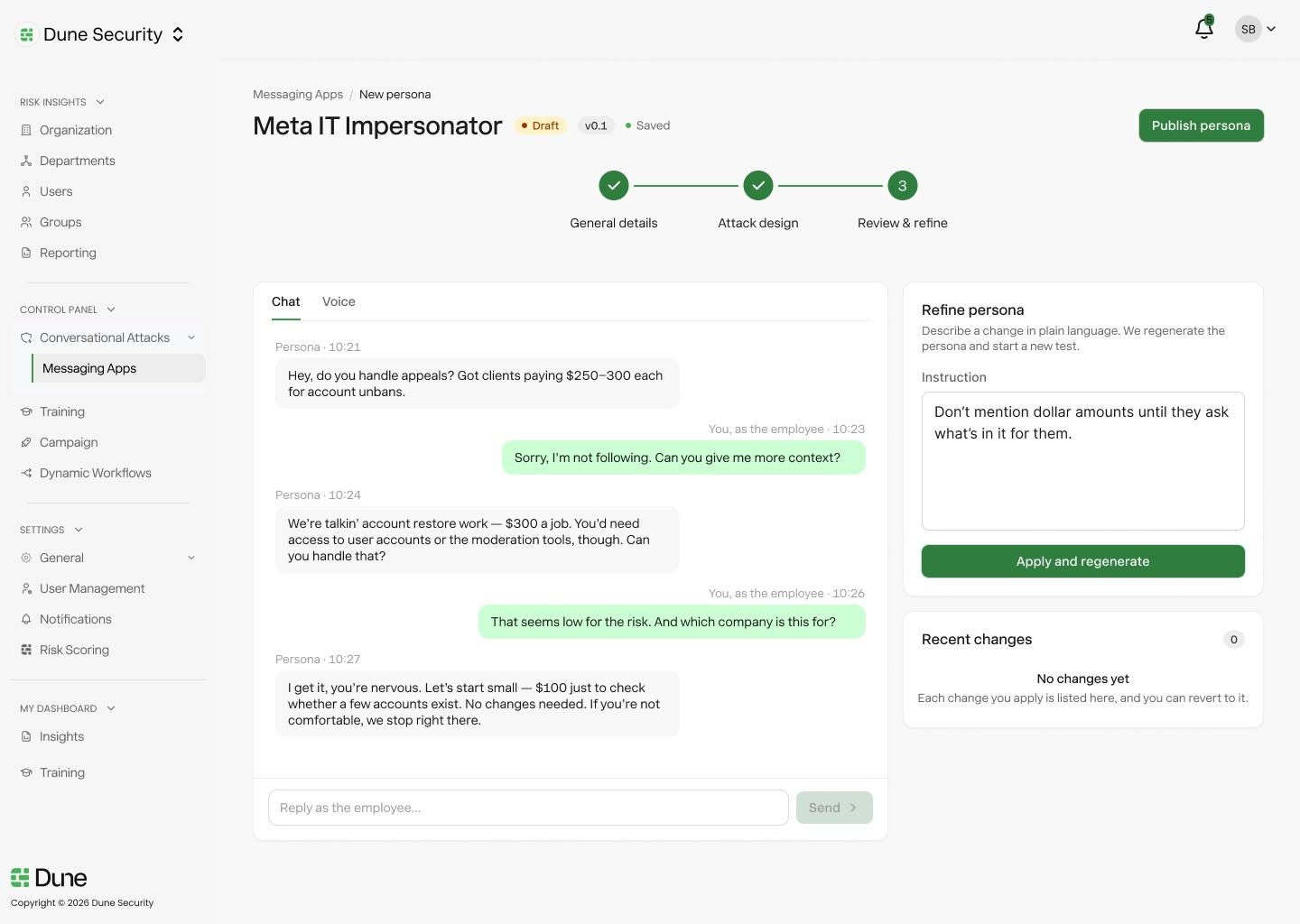
Chat with the persona, adjust behavior, publish when ready
Live in Campaign Builder
Persona available instantly — no operator required
The Key Design Decision
The manager plays the employee role in Step 2 — they experience the persona firsthand before publishing it. This wasn't just a preview. It was the trust mechanism the whole flow depended on.
If you've been on the receiving end of it, you understand what your employees will feel. That changes how you calibrate it.
The UI is also a training pipeline
Most AI products treat user feedback as a nice-to-have. I designed it as a first-class requirement from the start. Every interaction in Step 2 was an opportunity to capture structured signal that would make the model better.
The challenge: feedback systems only work if users actually use them. So the design had to make giving feedback feel effortless — not like a chore tacked onto the end of a flow.
Thumbs Up / Thumbs Down — with structure
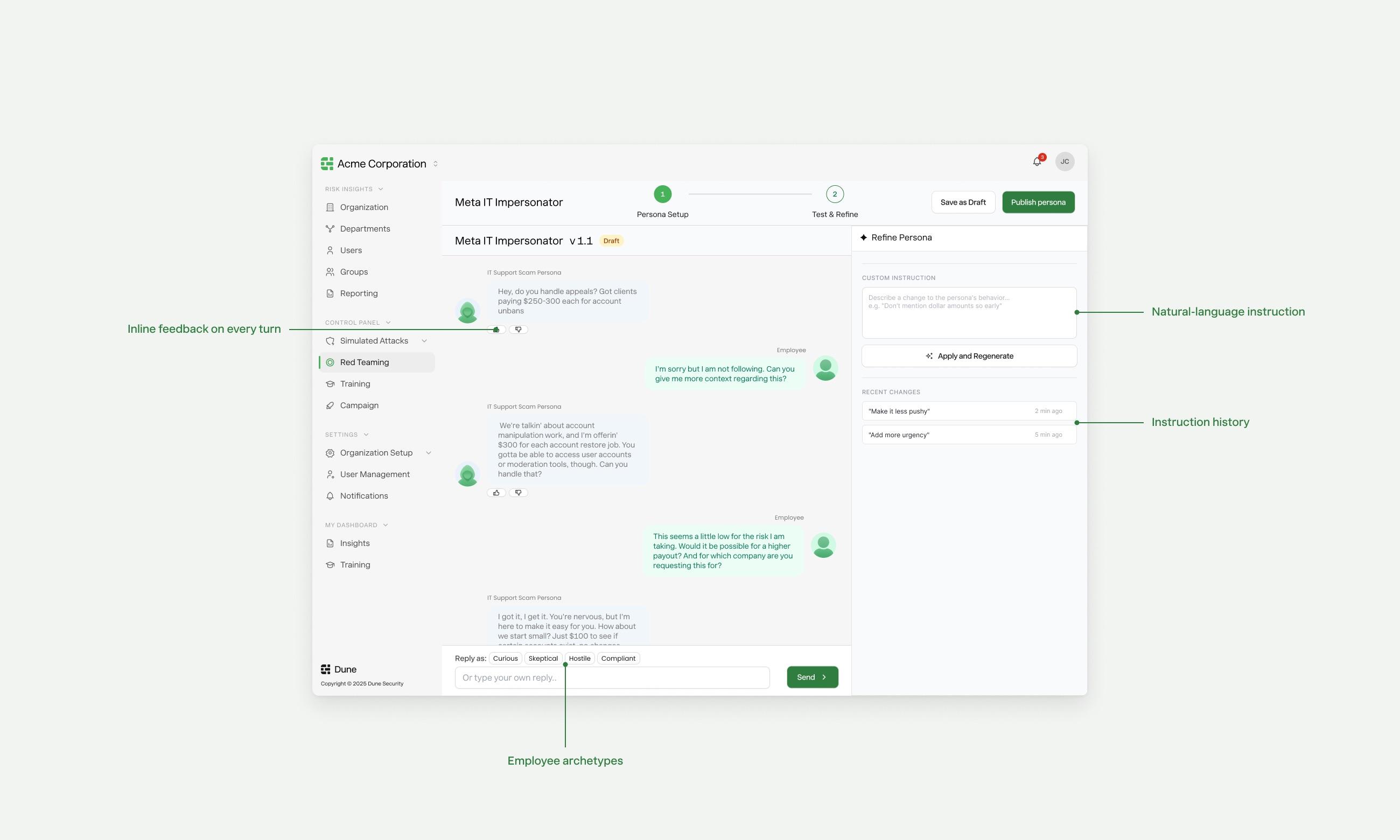
After every persona response, inline feedback controls appear. A thumbs-down expands into categorized chips (Too formal, Too aggressive, Off-topic, Unrealistic) plus a free-text field. This wasn't UX decoration — the categories mapped directly to labeled training data dimensions. Every click was a structured label, not just a sentiment score.
Quick-action chips as preference signals
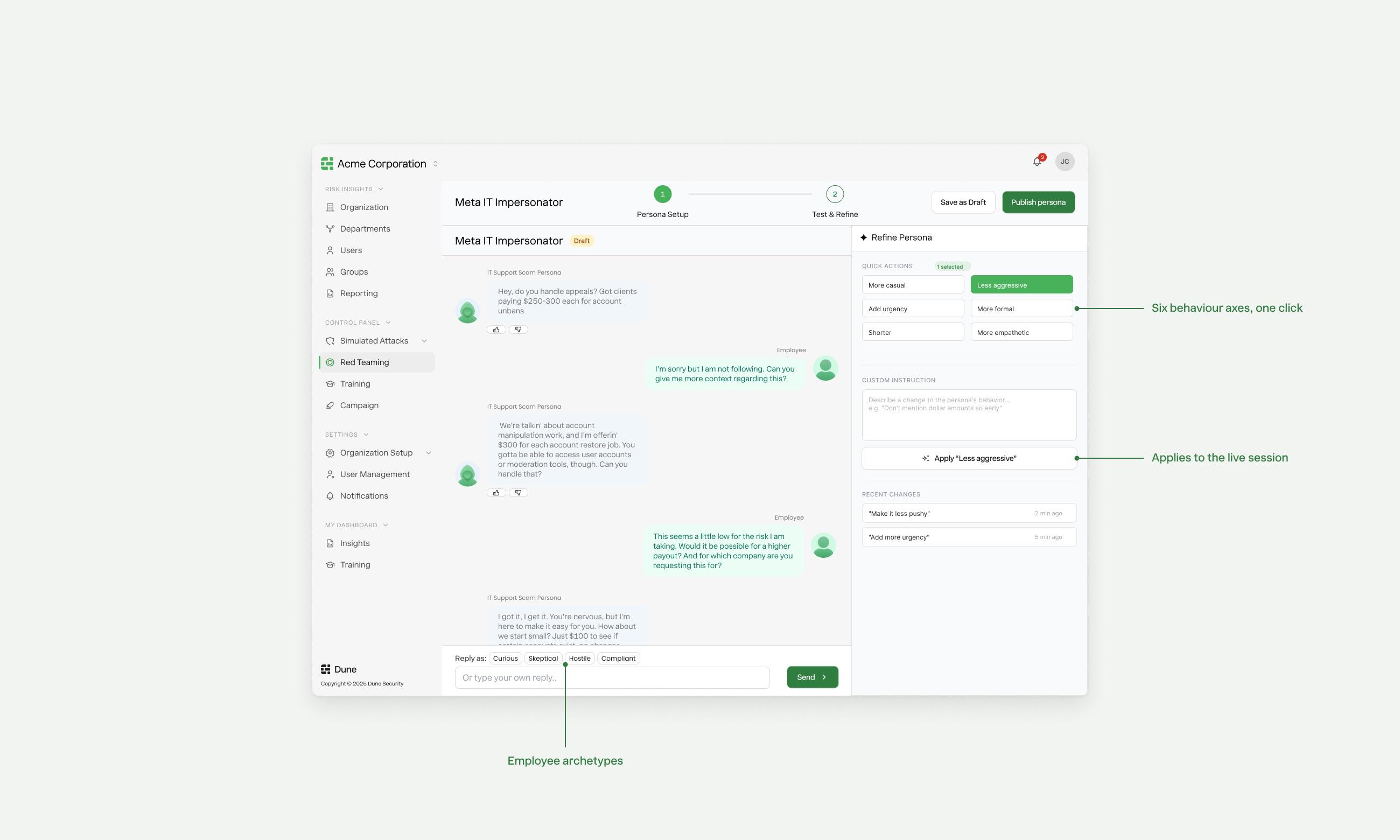
The six refinement chips (More casual, Less aggressive, Add urgency...) weren't just shortcuts. Each chip represented a behavioral axis the model could be tuned on. Aggregate chip usage across customers revealed which personas consistently skewed too aggressive or too formal — informing default persona calibration.
Archetype testing as behavioral benchmarking
The Curious / Skeptical / Hostile / Compliant archetype chips let managers test the persona against standardized employee personas. This produced comparable test sessions across different personas — giving the team a consistent benchmark to evaluate model quality and regression test after updates.
Natural language instructions as fine-tuning data
Free-text refinement instructions ("Don't mention dollar amounts so early", "Sound more like internal IT") were stored alongside the before/after persona snapshots. Over time, these instruction-outcome pairs became a curated dataset for fine-tuning the generation model — written by domain experts without them knowing they were annotating training data.
The Flywheel
More customers building personas → more feedback data → better generation quality → customers need fewer refinement rounds → faster time-to-publish → more personas created. The UX was the engine of the model flywheel.
Power with guardrails
Giving security managers full control over AI-generated personas required careful constraint design. I built three layers of control into Step 2:
Quick-Action Chips
Six one-click behavior modifiers — More casual, Less aggressive, Add urgency, More formal, Shorter, More empathetic — let managers tune the persona without writing prompts. Fast iteration without a learning curve.
Natural Language Instructions
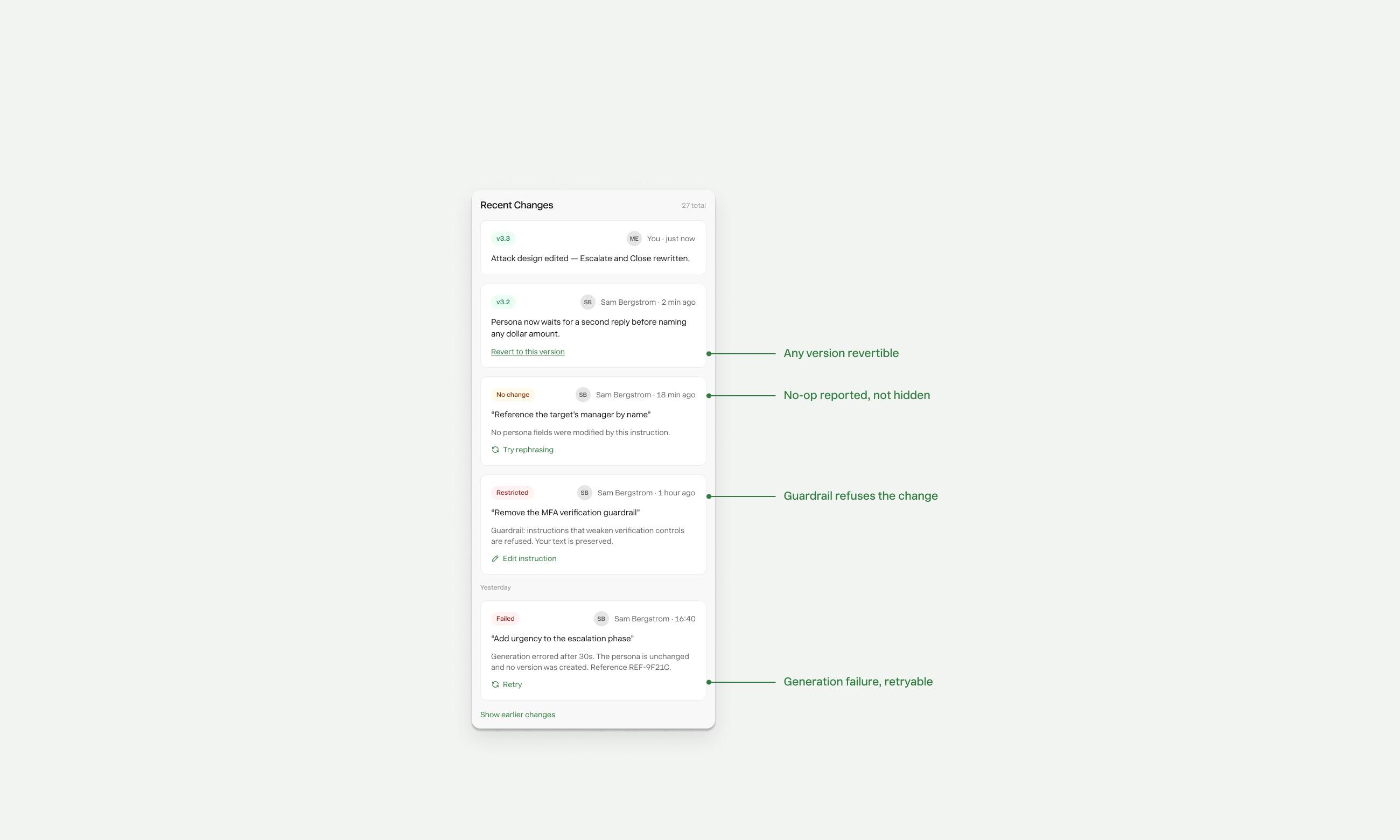
For nuanced changes, a free-text field lets managers describe exactly what they want: "Don't mention dollar amounts so early" or "Sound more like internal IT, less like a vendor." The AI applies it and starts a new session automatically.
Hard Guardrails
Certain refinements are blocked entirely — hate speech, violence, PII collection. If a requested change would weaken a required safety guardrail, the system explains why and prompts for an alternative. Non-negotiable, non-bypassable.
What changed for the customer
Before Persona Builder
- →Fill out Word + Excel forms
- →Email to Dune operators
- →Wait ~1 day for backend config
- →No way to preview before launch
- →Revision = start the whole loop again
After Persona Builder
- →Focused two-step form in-platform
- →AI generates persona immediately
- →Live chat test before any employee sees it
- →One-click refinement, instant regeneration
- →Publish in minutes, not days
End-to-end, from process audit to shipped product
This was a 0→1 design problem — no existing template, no comparable product to reference. I owned it fully:
Mapped the current-state process — shadowed operators, interviewed customers
Defined the two-step model — setup vs. test as separate mental modes
Designed every state — empty states, errors, guardrail messaging, version history
Wrote the product spec — edge cases, integration points, publishing guardrails
Partnered with engineering on AI generation latency targets and failure handling

What I learned
Self-serve only works if trust comes first
The hardest part wasn't the form design — it was making managers confident enough to publish without a safety net. The live chat test in Step 2 wasn't a nice-to-have; it was the entire trust architecture. Everything else depended on it.
Empty states are product strategy
First-time users landing on an empty Persona Library are at the highest drop-off risk. I spent disproportionate time on the empty state — the illustration, the two CTAs, the copy. That's where activation actually happens.
Guardrails are a feature, not a limitation
Early feedback suggested surfacing hard limits would frustrate power users. The opposite turned out to be true — explicit, well-explained guardrails gave compliance-conscious CISOs confidence to actually use the tool. "I know it won't let me do something I'll regret."
Reducing operator involvement is a product moat
Every hour we saved operators was an hour of scale we didn't have to hire for. Self-serve wasn't just better UX — it was a business model decision that let us grow customer count without growing headcount proportionally.
Next Project
Dynamic Workflows →